League of Legends Patch 26.5 arrived on March 4, 2026, bringing more than just champion balance changes and new chat penalties. For the first time in the game’s 17-year history, Riot has added a feature specifically designed to help new players master one of League’s most fundamental skills: last hitting .
The CS Assist Indicator is a visual tool that highlights minion health bars when they reach a threshold where a basic attack will secure the kill . After months of testing on PBE since August 2025, the feature has finally gone live—and it’s already sparking discussion about where to draw the line between accessibility and skill expression .
Here’s everything you need to know about the CS Assist Indicator and how to use it.
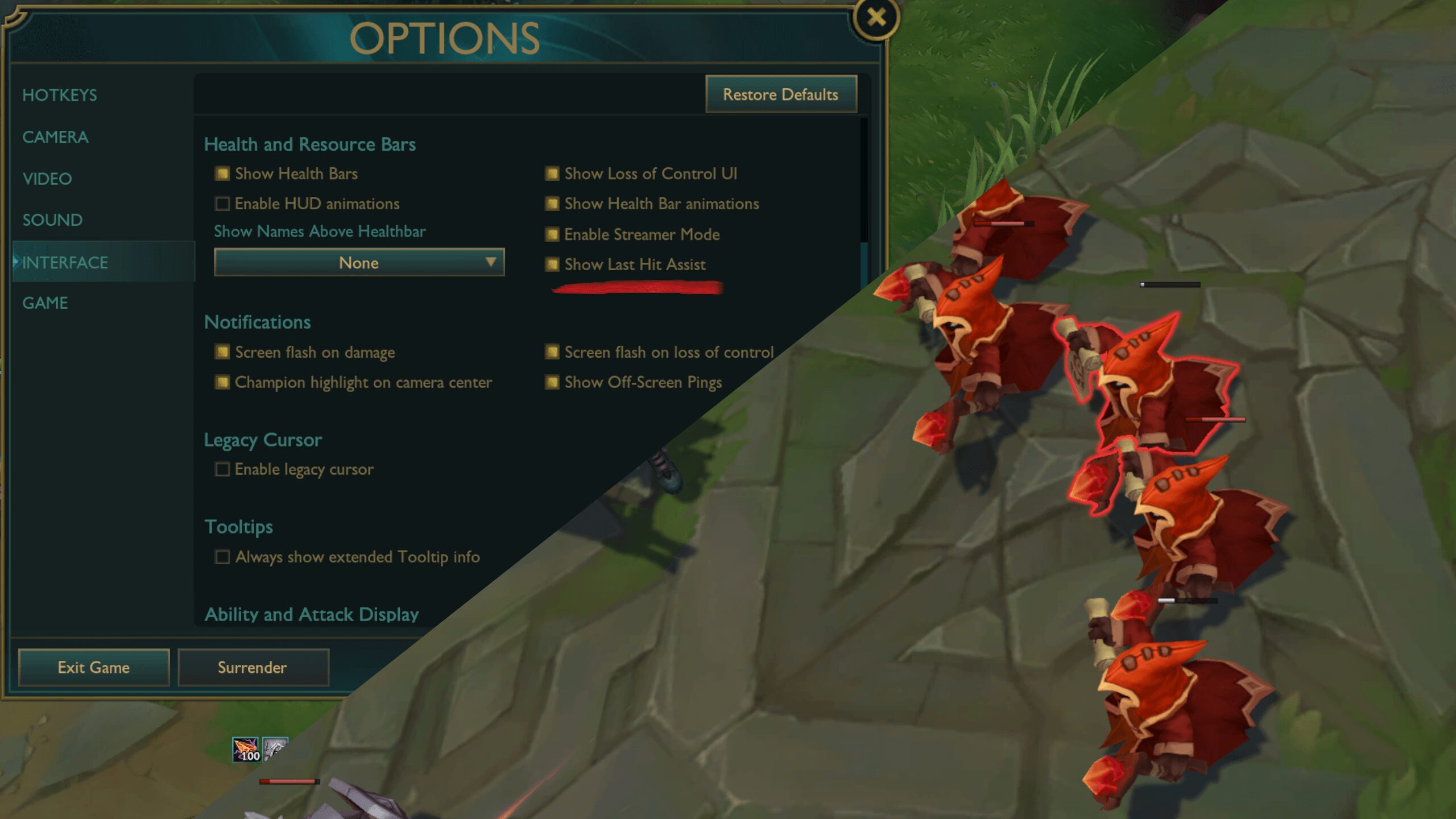
What Is the CS Assist Indicator and How Does It Work?
The CS Assist Indicator is a visual overlay that appears on minion health bars when they reach a point where a basic attack will secure the last hit . For new players, this solves one of League’s steepest learning curves—knowing exactly when to attack without instinctively understanding damage thresholds.
CS Assist Indicator: Complete Guide
| Feature | Details |
|---|---|
| What It Does | Shows when minion can be killed with basic attack |
| Supported Queues | Co-op vs AI, Tutorials, Swiftplay, Customs, Practice Tool, Rotating Game Modes |
| Default Setting | ON for new accounts, OFF for existing accounts |
| How to Toggle | Interface Options → Health and Resource Bars → “Show Last Hit Assist” |
| Not Supported | Azir (W), Graves, some on-hit interactions [citation:1] |
The system factors in permanent damage modifiers like base AD increases from leveling or item purchases . It’s also built to recognize many on-hit effects by pulling from existing spell data and damage calculations already present in the game .
However, Riot emphasizes this is intentionally not all-encompassing. The indicator does not account for active spell damage and excludes variables like critical strike chance . Damage types also aren’t fully differentiated—melee minions gain armor over time, while super minions have distinct base stats .
Some champions with unique attack patterns—such as Azir’s soldiers (W) or Graves—are not currently supported .
Where Can You Use It? Queue Restrictions Explained
Riot has deliberately limited the CS Assist Indicator to non-competitive environments . The feature is designed to help new players learn, not to provide advantages in ranked play.
The indicator is available in:
Riot developers explained their reasoning: “We’re going to be letting the indicators sit in queues that newer players are mostly playing and will be monitoring how they’re going before thinking about whether we should extend them further” .
For now, Ranked, Draft, and Normal queues do not include the feature. Veterans who want to practice last hitting can still use it in Customs or Practice Tool, but it won’t appear in actual matches against other players.
By default, the feature is disabled for existing accounts and automatically enabled for all accounts created after Patch 26.5 . But any player can toggle it on or off at any time via the Interface Option menu, under the “Health and Resource Bars” section, listed as “Show Last Hit Assist” .
Why Riot Added It and What It Means for New Players
The CS Assist Indicator is part of Riot’s broader push to modernize League of Legends and make it more accessible to casual audiences . Recent updates reflect this direction—including the introduction of optional WASD movement controls to attract players from other genres .
For years, League’s traditional click-to-move system has been a barrier for new players, inherited from classic real-time strategy titles that have become increasingly niche . By adding visual guidance for last hitting, Riot hopes newcomers can focus on other aspects of gameplay while developing their instincts naturally.
The system has been in testing on PBE since August 2025, with Riot iterating on how it calculates damage and how clearly it communicates kill thresholds without overwhelming the player .
Riot has emphasized that the goal isn’t to automate last-hitting entirely, but to provide clearer visual guidance . For ranged champions, particularly those with lower attack damage, pre-firing autos before the indicator appears will often remain necessary to secure gold consistently .
The feature is designed to be relatively self-sustaining—as long as prediction data is properly configured and updated when abilities are reworked, it shouldn’t require constant maintenance for every balance patch .